Building Skills for AI Agents: Lessons & Best Practices
Agent Skills are one of the most practical ways to make an AI agent reliably good at your specific workflows. Over the past months I've built and refined a number of them — here are the lessons and best practices I keep coming back to.
Caveat
Mostly based on Claude. Most practices apply to other agents/providers too, but the mechanisms differ slightly, so please adjust accordingly.
References
- Skill authoring best practices — Claude API Docs
- Skill Authoring Patterns from Anthropic's Best Practices
- The Complete Guide to Building Skills for Claude (PDF)
- Equipping agents for the real world with Agent Skills — Anthropic
- Writing effective tools for AI agents — Anthropic
- Building Effective AI Agents — Anthropic
Understanding the limitations of AI and Agent Skills
LLM limitations
To build better skills, understand what the model can't do on its own (that Agent Skills can help with):
- Frozen, generic procedural knowledge — the weights hold generic how-to, not your workflows, conventions, or exact tool syntax — and the model hallucinates specifics (CLI flags, API schemas) when forced to guess.
- Context limit — finite window; recall degrades mid-context ("lost in the middle"); every token costs latency + money.
- Memory state:
- Statelessness — no persistent memory across sessions by default; each conversation starts fresh unless you engineer memory/retrieval.
- Context ≠ understanding — stuffing the window isn't the same as learning; the model doesn't update its weights from your conversation.
- Non-determinism / unreliability — the same prompt can yield different outputs; left to improvise, the model varies its approach run to run.
Skills as procedural memory (one of the solutions)
Skills are externalized procedural memory / packaged expertise — "how to do X," added or updated without retraining.
- Fills the procedural gap — encodes your specific how-to + exact specifics, so the model stops guessing.
- Beats the context limit — progressive disclosure: only the one-line description stays loaded; full instructions load only when triggered → speed + cost.
- Survives statelessness — durable across sessions; the agent "knows how" every time.
- Stabilizes reliability — a vetted, codified procedure replaces improvisation → consistent, repeatable runs.
What is a skill
A skill is a folder Claude loads on demand to extend what it can do — packaged instructions (+ optional code and resources) that follow the Agent Skills open standard.
SKILL.md(required): Markdown instructions with YAML frontmatter (name,description).scripts/(optional): executable code (Python, Bash, etc.) Claude runs without loading into context.references/(optional): documentation loaded only as needed.assets/(optional): templates, fonts, icons used in the output.
Understanding how skills are invoked
It's a progressive disclosure process.
- Scan (startup): Claude Code reads all skill dirs — personal, project (up to repo root + nested), plugin, bundled — but loads only
name+description(from the YAML) into the system prompt (Level 1). - Invoke — two ways:
- Manually trigger
/skill-name. - Claude auto-loads it when your request matches the description (pure model reasoning, no embedding/classifier) → so the description is your highest-leverage line.
- Manually trigger
- After firing: the
SKILL.mdbody persists as one session message (not re-read each turn); referenced files/scripts load only when reached. - Gate who can invoke:
disable-model-invocation: true→ manual-only; description dropped from context (e.g./deploy,/commit).user-invocable: false→ Claude-only; hidden from the/menu (background knowledge).
Understanding tools, scripts, and subagents
A skill is only an orchestrator — without tools, neither you nor the AI can actually do the work. The skill decides what and when; tools and scripts do the deterministic how.
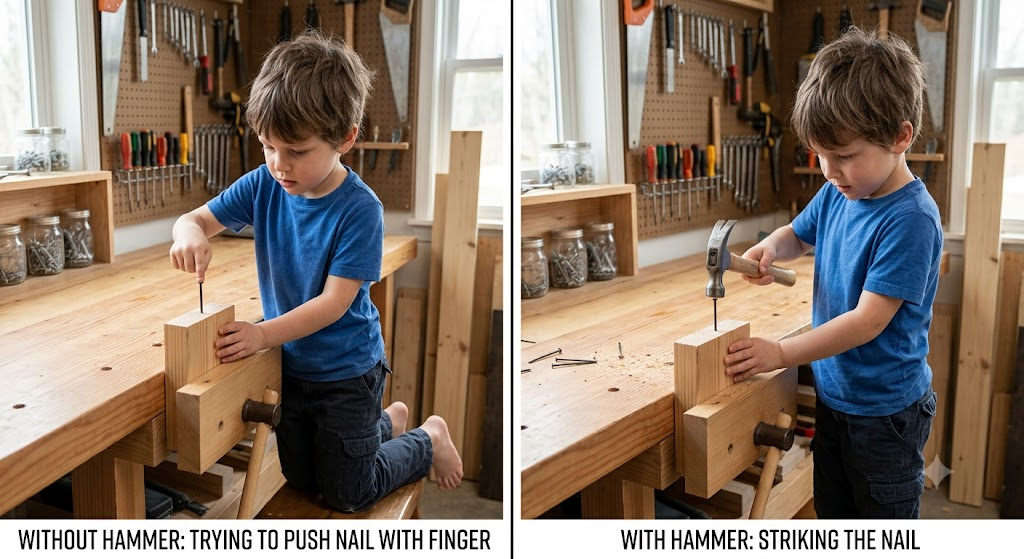
A skill without tools is like trying to drive a nail with your finger. Give it the right tool and the work actually gets done.
Best practices and patterns
It's about context optimization and management for efficiency and reliability — always anchored to what problem are we trying to solve.
1. Build it like a product — define use cases and input → output first
A skill is a product (or you're building a process). Before writing instructions, answer:
- Use case / JTBD — what job does this skill do, and when should one reach for it?
- Who is the user — yourself, your team, the public?
- User journey + systems thinking — input → process → output:
- Input:
- What can be inferred from context? Where is that context?
- What must be provided by the user?
- Process:
- What are the steps? Input/output for each intermediate step.
- Which steps are deterministic (→ script/tool) vs. judgment calls (→ Claude, human)?
- Does it call other skills?
- Output:
- What artifacts does the skill produce? What side effects (API calls, file writes, Slack posts)? What's the format or template?
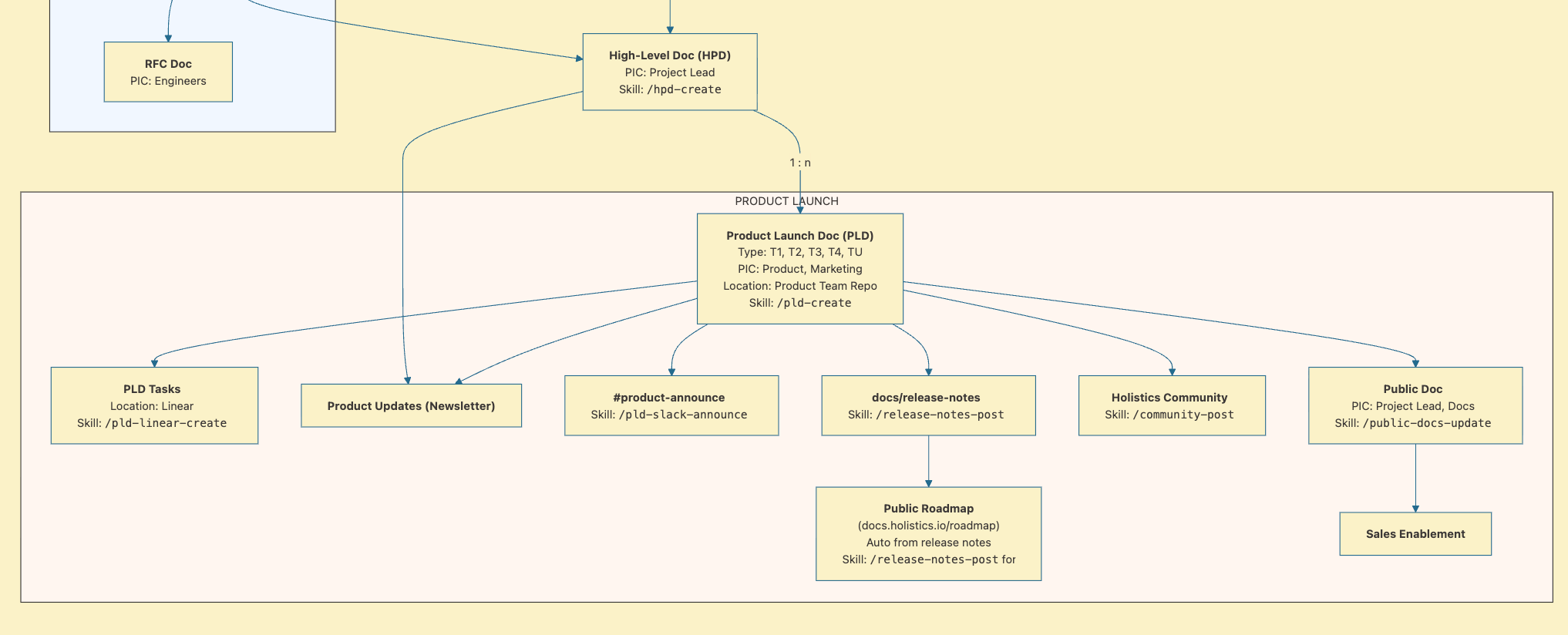
- Note: if the flow contains multiple skills and sophisticated concepts, try to map out their relationships and references.
- Input:
- UX — anticipate obstacles and things the user won't understand; ask clarifying questions; test with real users.
Another analogy: it's also like writing docs or teaching — you have to instruct someone clearly, but every time there's a new person with a fresh memory doing it again.
Example
- Remotion
zoom-event-create- Required input: frame, composition, x, y.
- The tool must provide these inputs or ask the user to enter them manually.
2. Two ways to start building a skill
- Workflow 1 — Output first
- Codify after proof. Run the workflow manually → refine via feedback → invoke skill-creator.
- The artifact is the spec. Let the output reveal requirements instead of pre-specifying them.
- Workflow 2 — Spec first
- Describe your workflow up front, then build to it.
3. Concision is the prime directive
"The context window is a public good." Every skill description (and every loaded skill) counts against the context window. Most of the practices below exist to optimize context management.
- Assume Claude is already smart — only add what it doesn't already know. Challenge every paragraph: "Does this justify its token cost?" Keep the
SKILL.mdbody under 500 lines; split beyond that. (best-practices doc) - Skill-creator / AI tends to be verbose and overthink — bad for context management. Force the output back down to concise. Double-check what it creates and ask it to tighten.
Example
- ❌ "Save the article as a markdown file. The file name must end with .md. Markdown files can only be opened by a markdown editor. Usually, markdown files are opened with Obsidian."
- ✅ "Save the article as a markdown file."
4. Progressive disclosure is the core architecture
Three levels of loading — design for it deliberately:
- YAML metadata (name + description) — always in the system prompt (~100 tokens/skill).
SKILL.mdbody — loaded only when the skill fires.- Reference files / scripts — loaded (or executed without loading) only when needed.
- Avoid deeply nested references — keep all reference files one level deep from
SKILL.md; nested refs cause Claude to do partial reads withhead -100. - Organize by category or domain and reference them conditionally so only related context loads (the
reference/finance.md,reference/sales.mdpattern). (Agent Skills blog, best-practices doc)- Example:
- ❌ "For flow A do this …100 lines… for flow B …200 lines…"
- ✅ "For flow A, reference
ref/flow-a.md. For flow B, referenceref/flow-b.md."
- Example:
5. The description is the highest-leverage line you write
It's a firing condition, not a summary — the single most important line; it determines whether Claude invokes the skill at all.
Structure that works: include both what it does AND when to use it, with concrete trigger terms/phrases.
[What it does] + [When to trigger] + [Key signal phrases or slash command]
Other tips:
- This is a process, not a dialog.
- Add negative triggers: "do NOT trigger on general X questions" to prevent false positives.
- Be concise.
- Test before shipping: can you write 5 queries that should trigger it and 5 that shouldn't? Run them mentally first.
- The trigger condition can be other skills.
Anti-patterns:
- Too broad → false positives; the skill fires on unrelated requests.
- Too narrow → misses valid invocations from users who phrase it differently.
- Only lists the slash command → never fires for users who don't know it exists.
Target: ~90% of relevant natural-language queries should trigger the skill without the user knowing the slash command.
6. Classify each step as judgment or deterministic, then wire tools accordingly
Match specificity to task fragility:
- Non-deterministic / high freedom → prose
- When many approaches work (e.g. code review).
- When you need heuristic judgment from the AI agent or a human.
- Medium freedom → pseudocode / parameterized scripts, when a preferred pattern exists.
- Highly deterministic / low freedom → exact script or tool, to save tokens and ensure reliability.
- When operations are fragile/destructive (e.g. DB migrations).
- When it's reusable and deterministic.
Example
- Deterministic task: ❌ "Download this website to markdown."
- ✅ "Run the script
web_to_markdown.pyto download the website."
- ✅ "Run the script
7. Evaluation
My common eval flow
- Write ~3 eval scenarios.
- Run Claude on real tasks without the skill vs. with the skill to identify the gaps.
- Iterate to improve the skill.
Note: you can ask the agent to do all of the above.
Evaluation-driven development (from Claude's Skill authoring best practices)
- Identify gaps: run Claude on representative tasks without a skill. Document specific failures or missing context.
- Create evaluations: build three scenarios that test these gaps.
- Establish baseline: measure Claude's performance without the skill.
- Write minimal instructions: create just enough content to address the gaps and pass evaluations.
- Iterate: execute evaluations, compare against baseline, and refine.
Anatomy of a test scenario
| Component | What to write |
|---|---|
| Prompt | Exact user input, using a real past date / real URL / real file. |
| Expected output | Describe or paste the ideal artifact (structure, not verbatim content). |
| Assertions | 3–5 checkable facts: "report has ≥3 competitors", "each bullet has a YouTube link", "filename matches YYYY-MM-DD format". |
| Anti-assertions | Things that should NOT appear: "no /embed/ YouTube URLs", "no --- horizontal rules in Slack output". |
Levels of testing (fastest → most thorough):
- Manual in Claude.ai — run the trigger phrase, observe output. Fast, no setup.
- Scripted in Claude Code —
claude -p "run test case 1 from SKILL.md"— repeatable across changes. - Programmatic via API — full eval suite, compared against baseline before publishing changes.
Tips:
- There are multiple levels at which to eval and run tests; which you choose depends on how reliable you want the skill to be.
- Evaluation costs tokens, so if the skill is simple or deterministic, just test it by using it.
- Always use real, fetchable data — abstract test prompts produce simulated, unverifiable outputs.
- Run evals after any change to skill logic, prompts, or the reference files the skill reads.
- When refactoring an existing skill, run evals against both the old and new version and diff the outputs.
- Delete stale test cases that reference data that no longer exists.
8. Develop iteratively with two agents (A/B loop)
- Agent A helps you author/refine the skill.
- Agent B (a fresh instance) uses it on real tasks.
- Watch B's behavior → bring specific failures back to A → refine.
- Agent C (optional) critiques the skill itself — a third instance that reviews the
SKILL.mdfor clarity, concision, and gaps, independent of A and B.
9. Continuously optimize the skill
If something is wrong or doesn't match your expectations, remember to return to the skill and improve it. This way, the next time, it will better align with your preferences.
10. Naming, structure & content hygiene
- Consistent terminology — pick one term and stick to it.
- Gerund naming:
processing-pdfs,analyzing-spreadsheets. - My alternative — concept-first, skill as action:
prd-create,prd-publish.
- Gerund naming:
- One skill, one purpose — if workflows don't share state, make separate skills.
11. Workflows & feedback loops for complex tasks
Break complex ops into sequential steps; give Claude a copy-able checklist to track progress. Build in validator → fix → repeat loops ("only proceed when validation passes"). (best-practices doc)
12. Using skills from others
- Understanding: understand the skill's problem, process, input, and output before relying on it — at least ask the AI to summarize it for you.
- Security: install skills only from trusted sources; audit unfamiliar ones.
- Familiarize yourself with the built-in skills first.
13. Other minor patterns
- Pointers beat descriptions.
- Don't rely on Claude scanning all available tools / paths — unreliable & costly.
- Give URLs, file paths, and tag names verbatim — as precise as possible.
- For MCP tools, name the exact tool (e.g.
mcp__slack__post_message). - Only fall back to scanning if the exact path can't be found.
- Example:
- ❌ "Find the
docsrepo and do…" - ✅ "Browse
~/user/projects/docs…" - ✅ "Read
HOLISTICS_DOCS_PATHfrom.env. If not set, ask the user for their local path and tell them to add it to.env." (for a collaborative repo)
- ❌ "Find the
- Data in data files, logic in skill files.
- Example:
competitive_analysis_skill: "for each competitor inreferences/competitors.md, do…"
- Example:
- Split concerns into separate skills when they have their own failure modes. Ask: "should this be one skill or two?"
- Drill into why on every bug — accept the first fix only after you've understood the cause. When it's fixed, ask why and how.
- Distinguish tool-wrapper behavior from underlying API behavior.
- If the skill system is too complex or easily mistakenly invoked, don't let it be auto-invoked. Train users to invoke it themselves.
- Subagents can be invoked to perform tasks concurrently, reducing the context burden on the main agent. This is particularly useful when the task involves a single level of input and output.
- Don't over-optimize skills that aren't frequently used — match the effort to how often the skill actually runs.
14. A skill is a new product, so structural and systems thinking matters even more
- View things as a system of components — their connections, relationships, and purpose — and understand how things interrelate rather than in isolation.
- Continuously optimize the system to enhance its efficiency and ensure reliable outputs.